> ## Documentation Index
> Fetch the complete documentation index at: https://docs.tic.io/llms.txt
> Use this file to discover all available pages before exploring further.
# AI Intelligent Document Processing (IDP)
> TIC's IDP engine turns unstructured PDFs, scans, and images into structured, queryable data — the same tech powering our own datasets.
Intelligent document processing abbreviated IDP is a technique used to process paper-based documents or document images and
extract information and process into structured data. IDP uses machine learning algorithms to classify data and
natural language processing (NLP) to interpret the context of the data. Our IDP uses human-in-the-loop (HITL) to
enhance extraction models and continuously learning and improving based on human corrections.
We built our IDP engine tailored for financial and annual reports, KYC and other documents surrounding our area of expertise.
## Differences IDP vs OCR
Optical character recognition, OCR, should not be mistaken for IDP since OCR only deals with recognizing characters and converting
them into text. OCR has no features or understanding what the text means or how it should be extracted.
| | IDP | OCR |
| ---------- | ----------------------------------------------------------------- | ------------------------------------------------- |
| Used for | Extract information from paper-based documents or document images | Convert scanned documents to searchable documents |
| Technology | Classify, Entity Recognition, Extract, HITL, NLP | Pure character recogniztion |
| Use case | Extraction of data in financial reports, annual reports, KYC | Archiving, search |
## Market Growth
IDP market is expected to grow from 1.7 - 1.9 billion USD in 2023 to 17.2 - 19.3 billion USD in 2032 (CAGR 28.9% - 30.5%).
**That's more than ten times the coming 10 years**.
References:
[Market.us](https://market.us/report/intelligent-document-processing-market/) and
[Fortune Business Insights](https://www.fortunebusinessinsights.com/intelligent-document-processing-market-108590)
## Our IDP Flow
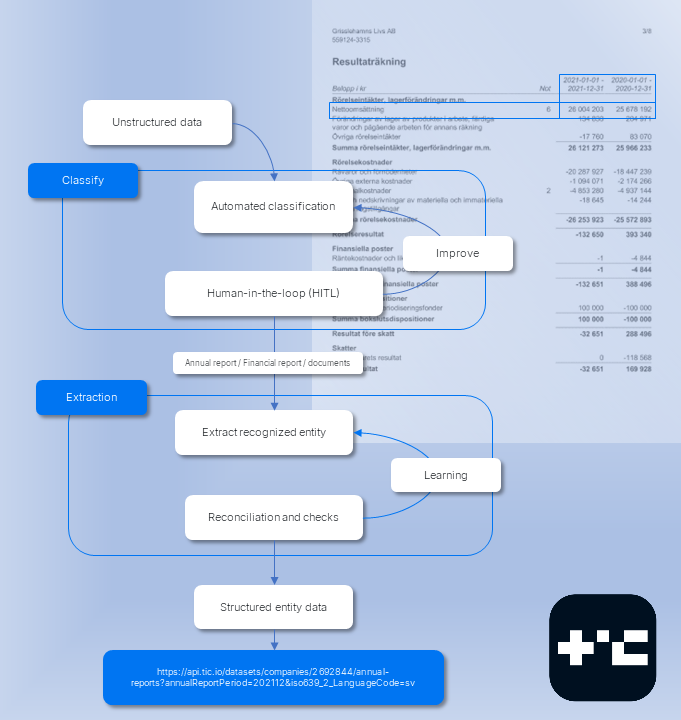
The flow of the IDP engine is shown in the image below highlighing an annual report being processed.
 ## Computer Vision
To provide superior recognition we use computer vision along with algorithms to identify location of areas in the documents.
Typical algorithms and filters used:
* [Canny edge detector](https://en.wikipedia.org/wiki/Canny_edge_detector)
* [Adaptive thresholding](https://en.wikipedia.org/wiki/Thresholding_\(image_processing\))
* [Dilation(morphology)](https://en.wikipedia.org/wiki/Dilation_\(morphology\))
* [Hough transform](https://en.wikipedia.org/wiki/Hough_transform)
## Extraction and OCR
One of the techniques we use for extraction in images and documents is
[agglomerative hierarchical clustering (AHC)](https://en.wikipedia.org/wiki/Hierarchical_clustering).
The algorithm finds dissimilarities between data and outputs an hierarchical representation.
Our OCR engine is based on Tesseract with a kind of recurrent neural network called long-short term memory (LSTM). We train
our models continuously based on the data we typically process.
## Example
### Step 1 - raw page
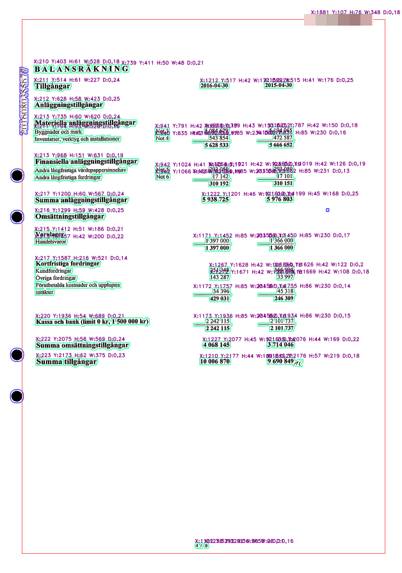
The following image shows a raw page that has been highlighted by the IDP engine. The blue marked areas
are going to be removed by the preprocessing system such as punch holes, stamps and page artifacts. Pages
will be automatically rotated, deskewed and cleaned. Text blocks and characters are enhanced.
## Computer Vision
To provide superior recognition we use computer vision along with algorithms to identify location of areas in the documents.
Typical algorithms and filters used:
* [Canny edge detector](https://en.wikipedia.org/wiki/Canny_edge_detector)
* [Adaptive thresholding](https://en.wikipedia.org/wiki/Thresholding_\(image_processing\))
* [Dilation(morphology)](https://en.wikipedia.org/wiki/Dilation_\(morphology\))
* [Hough transform](https://en.wikipedia.org/wiki/Hough_transform)
## Extraction and OCR
One of the techniques we use for extraction in images and documents is
[agglomerative hierarchical clustering (AHC)](https://en.wikipedia.org/wiki/Hierarchical_clustering).
The algorithm finds dissimilarities between data and outputs an hierarchical representation.
Our OCR engine is based on Tesseract with a kind of recurrent neural network called long-short term memory (LSTM). We train
our models continuously based on the data we typically process.
## Example
### Step 1 - raw page
The following image shows a raw page that has been highlighted by the IDP engine. The blue marked areas
are going to be removed by the preprocessing system such as punch holes, stamps and page artifacts. Pages
will be automatically rotated, deskewed and cleaned. Text blocks and characters are enhanced.
 ### Step 2 - post processed page
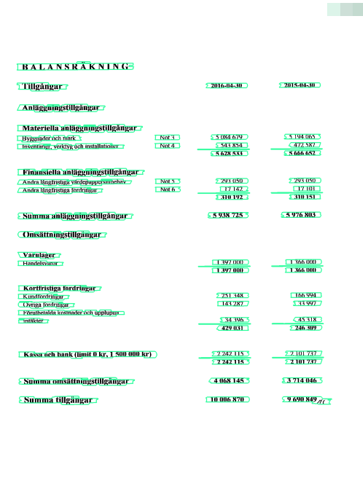
The following image shows the same page but post processed by the set of instructions to determine the locations
of meaningful data.
### Step 2 - post processed page
The following image shows the same page but post processed by the set of instructions to determine the locations
of meaningful data.
 ### Step 3 - determine data locations
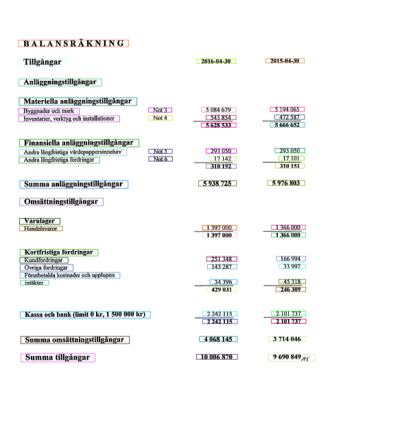
The following image shows the IDP engine locating areas of data subject for extraction.
### Step 3 - determine data locations
The following image shows the IDP engine locating areas of data subject for extraction.
 ### Step 4 - extract to entities and run NLP
The final step is to extract the data by intepreting the context through the use of natural language processing (NLP).
The data is then exposed in the API by a simple request:
```bash cURL theme={null}
curl https://api.tic.io/datasets/companies/2692844/financial-reports?
annualReportPeriod=202112&
iso639_2_LanguageCode=sv&
key=your_api_key
```
And the result looks like this (has been shortened because of large response)
```json Response theme={null}
{
"resultSheets": [
{
"order": 1,
"localizedFieldName": null,
"enFieldName": "Period",
"displayFormat": null,
"type": "Int",
"value": 202112,
"notes": null,
"highlight": null
},
{
"order": 2,
"localizedFieldName": null,
"enFieldName": "Duration",
"displayFormat": null,
"type": "Int",
"value": "12",
"notes": null,
"highlight": null
},
{
"order": 10,
"localizedFieldName": null,
"enFieldName": "Net sales",
"displayFormat": "N0",
"type": "Int",
"value": 26004,
"notes": null,
"highlight": null
},...
"footnotes": [
{
"order": 1,
"localizedFieldName": null,
"enFieldName": "Period",
"displayFormat": null,
"type": "Int",
"value": 202112,
"notes": null,
"highlight": null
},
{
"order": 2,
"localizedFieldName": null,
"enFieldName": "Duration",
"displayFormat": null,
"type": "Int",
"value": "12",
"notes": null,
"highlight": null
},
{
"order": 10,
"localizedFieldName": null,
"enFieldName": "Floating charges",
"displayFormat": "N0",
"type": "Int",
"value": 500,
"notes": null,
"highlight": null
},...
"keyMetrics": [
{
"order": 1,
"localizedFieldName": null,
"enFieldName": "Period",
"displayFormat": null,
"type": "Int",
"value": 202112,
"notes": null,
"highlight": null
},
{
"order": 2,
"localizedFieldName": null,
"enFieldName": "Duration",
"displayFormat": null,
"type": "Int",
"value": "12",
"notes": null,
"highlight": null
},
{
"order": 10,
"localizedFieldName": null,
"enFieldName": "Gross margin",
"displayFormat": "{0:#0.##\\%}",
"type": "Decimal",
"value": 21.98,
"notes": null,
"highlight": null
}
```
### Step 4 - extract to entities and run NLP
The final step is to extract the data by intepreting the context through the use of natural language processing (NLP).
The data is then exposed in the API by a simple request:
```bash cURL theme={null}
curl https://api.tic.io/datasets/companies/2692844/financial-reports?
annualReportPeriod=202112&
iso639_2_LanguageCode=sv&
key=your_api_key
```
And the result looks like this (has been shortened because of large response)
```json Response theme={null}
{
"resultSheets": [
{
"order": 1,
"localizedFieldName": null,
"enFieldName": "Period",
"displayFormat": null,
"type": "Int",
"value": 202112,
"notes": null,
"highlight": null
},
{
"order": 2,
"localizedFieldName": null,
"enFieldName": "Duration",
"displayFormat": null,
"type": "Int",
"value": "12",
"notes": null,
"highlight": null
},
{
"order": 10,
"localizedFieldName": null,
"enFieldName": "Net sales",
"displayFormat": "N0",
"type": "Int",
"value": 26004,
"notes": null,
"highlight": null
},...
"footnotes": [
{
"order": 1,
"localizedFieldName": null,
"enFieldName": "Period",
"displayFormat": null,
"type": "Int",
"value": 202112,
"notes": null,
"highlight": null
},
{
"order": 2,
"localizedFieldName": null,
"enFieldName": "Duration",
"displayFormat": null,
"type": "Int",
"value": "12",
"notes": null,
"highlight": null
},
{
"order": 10,
"localizedFieldName": null,
"enFieldName": "Floating charges",
"displayFormat": "N0",
"type": "Int",
"value": 500,
"notes": null,
"highlight": null
},...
"keyMetrics": [
{
"order": 1,
"localizedFieldName": null,
"enFieldName": "Period",
"displayFormat": null,
"type": "Int",
"value": 202112,
"notes": null,
"highlight": null
},
{
"order": 2,
"localizedFieldName": null,
"enFieldName": "Duration",
"displayFormat": null,
"type": "Int",
"value": "12",
"notes": null,
"highlight": null
},
{
"order": 10,
"localizedFieldName": null,
"enFieldName": "Gross margin",
"displayFormat": "{0:#0.##\\%}",
"type": "Decimal",
"value": 21.98,
"notes": null,
"highlight": null
}
```